Podcast Workflow: Studio & Remote Production Secrets
Optimize your podcast workflow! Streamline in-studio & remote production for consistent quality and efficiency.
Podcasting has exploded in popularity, offering a powerful platform for content creators, businesses, and thought leaders. But a great podcast isn’t just about compelling content; it’s also about a streamlined and efficient production workflow. Whether you’re recording in a professional studio or conducting interviews remotely, optimizing your process is crucial for maintaining consistent quality, minimizing errors, and maximizing your time. This article dives deep into optimizing podcast workflows for both in-person studios and remote setups, providing actionable strategies to elevate your podcasting game.
Understanding the Core Elements of Podcast Production
Before we dissect the specific workflows, let’s define the core elements of podcast production that apply to both studio and remote environments:
- Pre-Production: Planning, guest outreach, scriptwriting (if applicable), outlining, and technical setup.
- Recording: Capturing the audio, managing equipment, and ensuring a smooth conversation.
- Editing: Removing errors, adding music and sound effects, adjusting audio levels, and refining the overall sound.
- Post-Production: Adding intro/outro music, creating show notes, generating transcripts, optimizing for different platforms, and scheduling publication.
In-Person Podcast Studio Workflow: A Detailed Breakdown
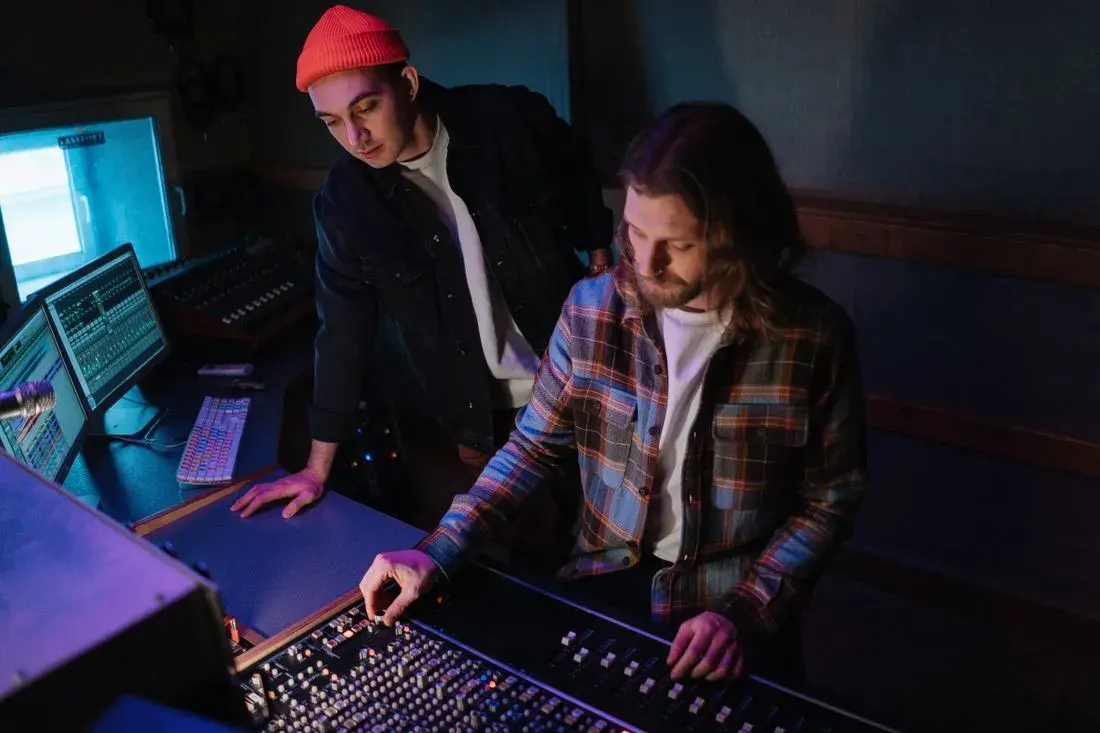
Recording in a dedicated podcast studio offers numerous advantages, including controlled acoustics, professional equipment, and the ability to collaborate face-to-face. However, even with these benefits, a well-defined workflow is essential for maximizing efficiency.
Pre-Production in the Studio
Effective pre-production lays the foundation for a successful studio recording session.
- Content Planning: Define the episode’s topic, create a detailed outline, and prepare talking points. This is where collaboration tools like Google Docs or Notion can be invaluable for sharing and iterating on ideas with co-hosts or guests. Example: For a recent cybersecurity podcast I consulted on, we moved from loosely defined topics to detailed, time-stamped outlines with specific examples of cyberattacks, significantly improving the coherence and engagement of each episode.
- Guest Communication: Send guests a detailed briefing document outlining the episode’s topic, key talking points, and any relevant background information. Include clear instructions on how to get to the studio and what to expect. Tip: Offering a pre-interview call helps build rapport and address any questions the guest may have.
- Equipment Preparation: Ensure all microphones, headphones, mixers, and recording devices are in perfect working order. Test the audio levels and make any necessary adjustments. Real-World Scenario: I once arrived at a studio only to discover one of the microphones was faulty. Fortunately, having a backup microphone saved the day, highlighting the importance of redundancy.
- Studio Setup: Arrange the studio space to optimize acoustics and create a comfortable environment for all participants. Consider using sound absorption panels to minimize echo and reverberation.
Recording in the Studio
The recording session is where your pre-production efforts come to fruition.
- Monitor Audio Levels: Continuously monitor the audio levels to ensure they remain consistent throughout the recording. Avoid clipping (audio distortion caused by exceeding the maximum input level). Most mixers have visual meters that make this easy.
- Clear Communication: Establish clear communication protocols with all participants. Use hand signals to indicate when someone needs to adjust their microphone or repeat a statement.
- Minimize Distractions: Turn off cell phones, silence notifications, and minimize any other potential distractions. A “do not disturb” sign on the studio door can be helpful.
- Record Backup Audio: Record a backup audio track using a separate recording device. This can be a lifesaver if the primary recording fails. Lesson Learned: Always, always, always have a backup. I’ve seen entire interviews lost due to a single recording failure.
Editing and Post-Production in the Studio Workflow
Post-production is where you refine your raw audio into a polished podcast episode.
- Audio Editing: Use audio editing software (e.g., Audacity, Adobe Audition, Descript) to remove errors, trim silences, and adjust audio levels.
- Noise Reduction: Apply noise reduction techniques to minimize background noise and hum.
- Adding Music and Sound Effects: Incorporate intro/outro music, sound effects, and other audio elements to enhance the listening experience. Ensure you have the appropriate licenses for all audio assets. Resources like Epidemic Sound offer royalty-free music.
- Mixing and Mastering: Mix the audio tracks to create a balanced and professional-sounding mix. Master the audio to optimize it for different listening environments.
- Show Notes Creation: Write detailed show notes that summarize the episode’s content, list key takeaways, and provide links to relevant resources.
- Transcription: Create a transcript of the episode. Transcripts improve accessibility, SEO, and allow for easy content repurposing. Services like Otter.ai or Descript offer automated transcription.
- Platform Optimization: Optimize the audio file for different podcast platforms (e.g., Apple Podcasts, Spotify, Google Podcasts). This includes setting the appropriate bitrate and metadata.
Key Insight: Implementing a detailed pre-production checklist and post-production workflow in a studio setting can reduce editing time by up to 30%, freeing up valuable resources.
Remote Podcast Workflow: A Different Set of Challenges
Remote podcasting offers flexibility and convenience, allowing you to interview guests from anywhere in the world. However, it also presents unique challenges, such as inconsistent audio quality and communication barriers.
Pre-Production for Remote Podcasting
Similar to studio recording, meticulous pre-production is crucial for remote podcasting, but with a greater emphasis on ensuring guest preparedness.
- Platform Selection: Choose a reliable platform for conducting remote interviews. Options include Zoom, Skype, Google Meet, and dedicated podcasting platforms like SquadCast or Riverside.fm. These platforms often offer features like separate audio track recording.
- Guest Onboarding: Provide guests with detailed instructions on how to use the chosen platform and test their audio equipment. Send a pre-interview checklist covering microphone placement, background noise reduction, and internet connection stability.
- Technical Rehearsal: Conduct a brief technical rehearsal with each guest to ensure their audio and video are working correctly. This is the time to troubleshoot any potential issues. Practical Application: I always schedule a 15-minute tech check with remote guests a few days before the actual recording. This proactive approach significantly reduces technical glitches during the interview.
- Backup Recording Solutions: Instruct guests to record their audio locally on their computer as a backup. This can be done using free software like Audacity or GarageBand. Example: Asking guests to record a local backup saved an episode once when my internet connection dropped mid-interview.
Recording Remotely
The remote recording session requires careful attention to audio quality and communication.
- Monitor Audio Quality: Continuously monitor the audio quality of all participants. If someone’s audio is poor, politely ask them to adjust their microphone or troubleshoot their internet connection.
- Active Listening and Engagement: Remote interviews can sometimes feel less engaging than in-person conversations. Make a conscious effort to actively listen to your guests and provide encouraging feedback.
- Minimize Latency Issues: Latency (delay in audio transmission) can be a major problem in remote interviews. Encourage participants to mute their microphones when they are not speaking to minimize echo and feedback.
- Utilize Visual Cues: Use visual cues (e.g., nodding, smiling) to show that you are engaged and attentive.
Editing and Post-Production for Remote Recordings
Editing remote recordings often requires more time and effort due to potential audio quality inconsistencies.
- Audio Normalization: Use audio editing software to normalize the audio levels of all participants, ensuring a consistent volume level throughout the episode.
- Noise Reduction and De-Reverberation: Apply noise reduction and de-reverberation techniques to minimize background noise and echo. Tools like iZotope RX are invaluable for cleaning up audio.
- Manual Editing: Be prepared to spend more time manually editing remote recordings to remove errors, fill in gaps, and improve the overall sound quality.
- Syncing Audio Tracks: If you have separate audio tracks from each participant, you will need to sync them together in your editing software. Pro Tip: A simple clap at the beginning of the recording provides a visual cue for easy synchronization.
- Show Notes and Transcription: Follow the same show notes and transcription process as you would for a studio recording.
- Accessibility Considerations: Ensure your final audio file meets accessibility standards, including providing a transcript and closed captions (if applicable).
Key Insight: Investing in high-quality remote recording software with features like automatic leveling and noise reduction can significantly streamline the post-production process.
Project Management Tools and Communication Protocols
Regardless of whether you’re recording in a studio or remotely, effective project management and clear communication protocols are essential for maintaining a smooth workflow.
Project Management Tools
Project management tools can help you organize tasks, track progress, and collaborate with your team.
- Asana: A versatile project management tool that allows you to create tasks, assign deadlines, and track progress.
- Trello: A visual project management tool that uses Kanban boards to organize tasks and workflows.
- Monday.com: A highly customizable project management platform that offers a wide range of features and integrations.
- Google Workspace: Google Workspace provides a suite of collaboration tools, including Google Docs, Sheets, and Calendar, that can be used to manage podcast production tasks.
Communication Protocols
Establish clear communication protocols to ensure everyone is on the same page.
- Regular Team Meetings: Schedule regular team meetings to discuss progress, address challenges, and coordinate tasks.
- Dedicated Communication Channel: Create a dedicated communication channel (e.g., Slack, Microsoft Teams) for all podcast-related communication.
- Clear Roles and Responsibilities: Define clear roles and responsibilities for each team member.
- Documentation: Document all processes and procedures to ensure consistency and avoid confusion.
Strategies for Maximizing Efficiency and Minimizing Errors
Here are some overarching strategies to optimize your podcast workflow, regardless of your recording environment:
- Batch Recording: Record multiple episodes in a single session to maximize efficiency.
- Template Creation: Create templates for show notes, transcripts, and social media posts to save time.
- Automation: Automate repetitive tasks using tools like Zapier or IFTTT.
- Outsourcing: Consider outsourcing tasks like audio editing, show note creation, and transcription to freelancers or agencies.
- Continuous Improvement: Regularly review your workflow and identify areas for improvement.
Maintaining Consistent Quality
Consistency is key to building a successful podcast. Here’s how to maintain consistent quality:
- Standard Operating Procedures (SOPs): Develop and document SOPs for all aspects of podcast production.
- Quality Control Checks: Implement quality control checks at each stage of the production process.
- Feedback Loops: Solicit feedback from listeners and team members to identify areas for improvement.
- Regular Training: Provide regular training to your team members to ensure they are up-to-date on the latest best practices.
Case Studies: Real-World Examples
Let’s look at a couple of real-world examples to illustrate how these strategies can be applied:
Case Study 1: Streamlining a Business Podcast with Remote Guests
Challenge: A small business was struggling to produce their weekly podcast due to inconsistent audio quality from remote guests and a time-consuming editing process.
Solution:
- Implemented a detailed guest onboarding process, including a technical rehearsal and instructions on recording local backup audio.
- Invested in high-quality remote recording software with automatic leveling and noise reduction.
- Outsourced audio editing to a freelancer specializing in podcast production.
Results:
- Improved audio quality and reduced editing time by 40%.
- Increased podcast listenership by 20% due to improved audio quality.
- Freed up the business owner’s time to focus on other aspects of their business.
Case Study 2: Optimizing a Studio-Based Interview Podcast
Challenge: An interview-based podcast recorded in a studio was experiencing delays in publishing episodes due to a lack of a clear post-production workflow.
Solution:
- Developed a detailed post-production checklist outlining all tasks and deadlines.
- Created templates for show notes, transcripts, and social media posts.
- Implemented a project management tool (Asana) to track progress and assign tasks.
Results:
- Reduced the time it took to publish an episode by 50%.
- Improved the consistency and quality of show notes and transcripts.
- Increased audience engagement due to more timely publication.
Conclusion: Choosing the Right Workflow for Your Podcast
Optimizing your podcast workflow is crucial for creating high-quality content efficiently and consistently. Whether you’re recording in a professional studio or conducting interviews remotely, the key is to develop a well-defined process that meets your specific needs and resources. By implementing the strategies outlined in this article, you can streamline your production processes, minimize errors, and create a podcast that resonates with your audience.
Consider what the best workflow is for your team and content. While remote podcasting offers flexibility and convenience, in-person studios provide more controlled environments and higher potential audio quality. The optimal approach depends on your specific circumstances and goals. Don’t be afraid to experiment and adapt your workflow as needed. The podcasting landscape is constantly evolving, so staying flexible and adaptable is key to long-term success.
By focusing on pre-production planning, efficient recording techniques, streamlined post-production processes, and clear communication, you can elevate your podcast from a hobby to a professional and impactful platform. Good luck, and happy podcasting!
This article was optimized and published by Content Hurricane.
Ready to build the real thing?
When you're ready for a done-for-you studio, book a discovery call and we'll map a build that fits your space.